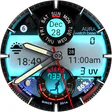
WB Digital Base 2 Watch Face
WatchBase AuraPersonalization
4.222.00 Reviews
- Version
- Varies With Device
- Installs
- 10.00K
- Age Rating
- Everyone
Screenshots
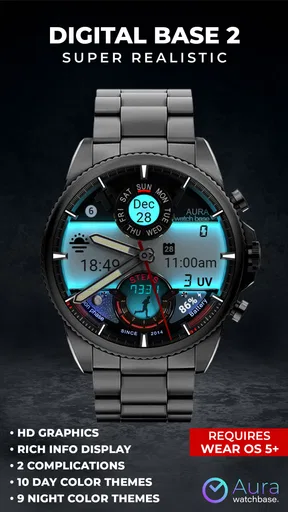
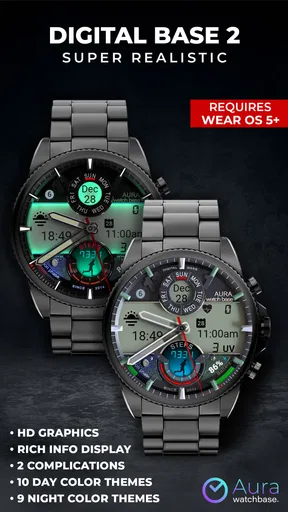
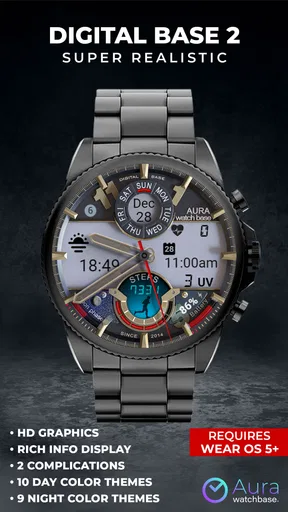
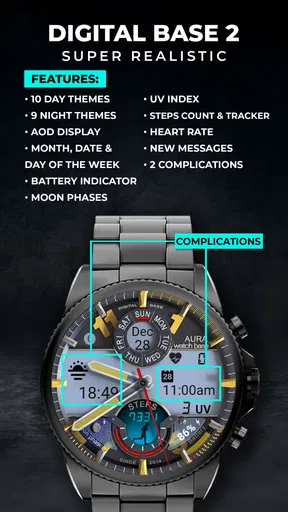
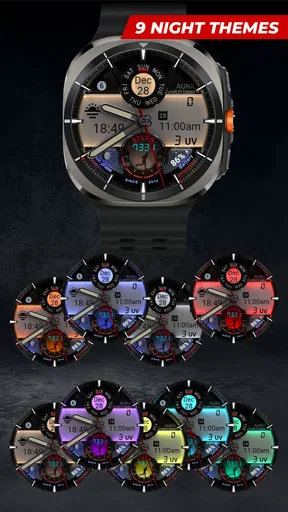
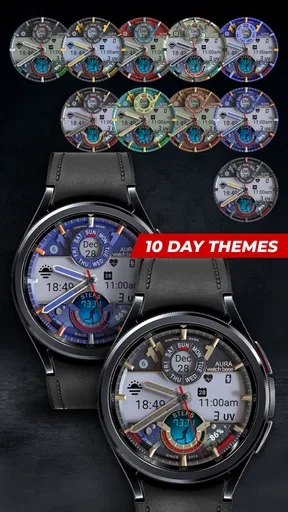
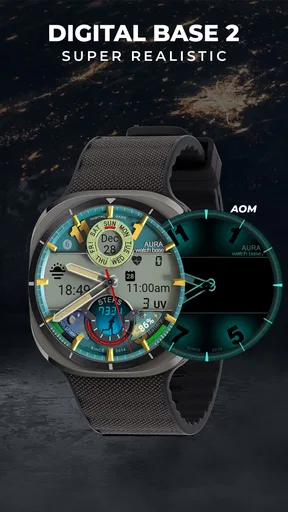
Our Review of WB Digital Base 2 Watch Face
 Analysis by Appyee
I spent time with WB Digital Base 2 as a personalization app for Wear OS, and my first impression was very clear: this is a watch face for people who want their wrist to look more like a compact digital instrument than a quiet, traditional watch. The glowing LED-style presentation gives it a strong visual identity, while the range of color themes makes it easier to match the face to different clothes, lighting conditions, or moods.
That visual focus is also the key to deciding whether it belongs on your watch. If you enjoy a bold digital display and like changing the appearance of your device, it has more personality than the standard faces that come preinstalled. If you mainly want a restrained face that disappears into the background, the bright styling may feel excessive. I found that the design works best when I treated it as a practical display with a decorative edge, rather than as a minimalist clock.
What makes this watch face worth trying
WB Digital Base 2 comes from WatchBase Aura and sits in the personalization category, where the real competition is not only other downloadable faces but also the default options already available on a Wear OS watch. Its appeal is immediate: the digital layout is designed to be noticed, and the LED-inspired glow gives the time a more futuristic look than a plain digital face.
The store summary describes a hyper-realistic watch face with glowing LED effects and many color themes. In everyday use, that combination matters because color is not merely decoration. A bright shade can make the face easier to recognize at a glance, while a darker or cooler theme may be less distracting in a meeting or indoors. I would not choose a theme only because it looks impressive in a screenshot; I would test it in sunlight, under indoor lighting, and at night before settling on one.
The app costs $2.99, which places it in the paid-watch-face space rather than the try-everything-for-free category. That price makes sense for someone who already knows they like this particular visual style. It is less compelling for a user who changes faces constantly and rarely keeps one installed for more than a day. The important question is not whether the face is inexpensive in isolation, but whether its distinctive look will earn a regular place on your wrist.
Its audience response is reasonably encouraging, with a 4.2 average from over 400 ratings and more than 10 thousand installs. I see those figures as signs of genuine interest rather than proof that it will suit every watch owner. A face can be well received and still be the wrong match for someone who values calm typography, maximum information density, or a very low-key appearance.
Where people are most likely to get stuck
The first frustration with any Wear OS watch face is often not the design itself. It is getting the face to appear in the right place after installation. A user may install the app on a phone, expect the watch to change immediately, and then assume something has failed when the current face remains active. I would begin by checking the watch’s own face-selection screen rather than repeatedly opening the phone app.
Another common point of confusion is device compatibility. WB Digital Base 2 is presented for Wear OS, so the relevant question is whether the watch runs Wear OS, not simply whether it is a modern smartwatch. A phone and watch can be paired correctly while still not offering the same face installation path. Before spending time troubleshooting, I would confirm the operating system on the watch and make sure the watch is connected to the phone.
There is also a difference between installing a watch-face app and applying a watch face. Those actions can happen through separate screens, depending on the watch and the version of Wear OS in use. If the face is installed but not visible among the available choices, I would look through the complete face gallery, including any section for downloaded or installed faces, instead of assuming the purchase or installation disappeared.
A less obvious issue is timing. Wear OS may take a moment to synchronize a newly installed face, especially when the watch is busy with updates, charging, or another connection task. Tapping through multiple menus in quick succession can make the process feel more broken than it is. My practical advice is to keep the watch unlocked, leave it connected, and give the installation a short pause before trying again.
Setup checks that save unnecessary troubleshooting
I would set up the face in a simple order. First, confirm that the watch is paired and has a stable connection. Next, check that the app was installed for the watch rather than only for the phone. Then open the watch’s face picker and search for WB Digital Base 2 by its short store name, “WB Digital Base 2,” rather than relying on a thumbnail that may be hard to recognize among similar digital faces.
Once it appears, apply it from the watch itself if that option is available. This avoids a common loop in which the user keeps returning to the phone while the actual selection still needs to be made on the watch. If the face offers its color themes through a customization screen, change one visual element at a time. That makes it easier to identify whether a particular theme is too bright, too low-contrast, or simply less readable in your normal environment.
I also recommend checking the result with the wrist held naturally, not only while the watch is directly in front of your eyes. A glowing digital design can look excellent head-on but become less comfortable when viewed at an angle. Try it while walking, sitting at a desk, and checking the time briefly in a dim room. This is a better test than judging it from the installation preview.
Battery expectations deserve a realistic check as well. The visual effects are part of the attraction, but a watch face with a strong illuminated style may not be the best choice for someone who is already trying to stretch battery life as far as possible. I would not make a precise battery claim because the result depends on the watch, brightness, display behavior, and other settings. Instead, compare your watch’s normal daily endurance before and after using the face for a full routine.
How I recover when the face does not appear
If the face is missing, I would avoid uninstalling everything immediately. The safer first steps are to verify the connection, check the watch’s installed-face list, and restart the watch if the new face still does not appear. A restart can refresh the relationship between the watch, the phone, and the Wear OS face catalog without changing the design or purchase decision.
If the app is visible on the phone but not on the watch, I would check the watch’s app or face management area and look for a pending installation. If the watch shows the face but applying it fails, I would return to the face picker, select another face temporarily, and then try WB Digital Base 2 again. This simple switch can refresh the selection process and is less disruptive than resetting the entire watch.
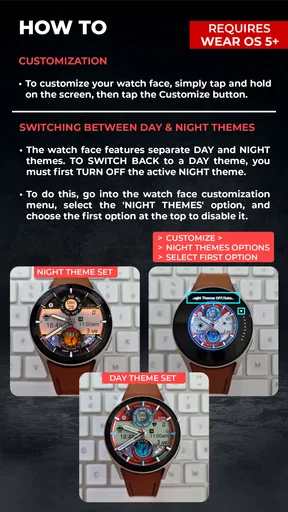
When customization seems unavailable, I would first apply the face successfully and only then look for its settings. Some Wear OS controls are reached by pressing and holding the active face, while others are exposed through the companion app or the watch’s face settings. The exact route can vary between watches, so I would follow the controls shown by the watch rather than assuming every model uses the same menu.
One useful recovery habit is to change only one thing between attempts. If you restart the watch, reinstall the app, change the connection, and alter several settings at once, you lose the ability to tell what solved the issue. My preferred sequence is connection check, face-gallery check, restart, temporary face switch, and only then a fresh installation attempt. That keeps the process controlled and reduces the risk of creating a second problem while fixing the first.
When the watch or connection is the real problem
It is easy to blame the face because it is the newest thing on the device, but many failures occur elsewhere. If other watch apps are also slow to install or update, the broader Wear OS connection is a more likely cause than this particular design. Likewise, if the watch is low on storage, busy installing system updates, or repeatedly losing its phone connection, a new face may simply be caught in the same wider problem.
The phone can also create misleading symptoms. A weak Bluetooth connection, an outdated companion app, or a phone that is restricting background activity can delay synchronization. I would test whether the watch can receive other ordinary updates before deciding that WB Digital Base 2 is defective. If every other function behaves normally and only this face remains unavailable, then reinstalling the specific app becomes a more reasonable next step.
Display behavior can be mistaken for a design flaw too. A face may look dim because of automatic brightness, a low-power mode, or the watch’s ambient display behavior. Before rejecting the glowing style, compare it in the watch’s normal active-display state and in its low-power state. If your priority is constant brightness and maximum visibility, the watch’s own display settings may matter more than the selected theme.
The same applies to readability. If the time is clear in a preview but difficult to read outdoors, that may be a contrast or brightness issue rather than an installation issue. Try another color theme and adjust the watch display before abandoning the face. On the other hand, if none of the themes work comfortably in your usual conditions, that is a legitimate reason to choose a simpler face with stronger everyday legibility.
Everyday workflows where it makes sense
I think the strongest use case is quick time checking during a busy day. Imagine leaving a meeting, glancing at the wrist while carrying a notebook, and seeing a large digital presentation without needing to interpret hands on a dial. The LED-inspired styling can make that glance feel immediate, especially for users who prefer numbers and visual contrast over analog decoration.
It can also work well as a change-of-pace face. I would use one of the brighter themes for a casual weekend, travel, or an evening when the watch is part of the outfit rather than merely a utility. For work, I would choose a calmer color if available and check whether the effect remains readable without drawing too much attention. This gives the app more value than a face that looks good only in a store preview but feels tiring after several hours.
A practical tip is to judge the face at the exact moments when you normally check the time. If those checks happen outdoors, test it outdoors. If you mostly look at the watch under office lighting, make that your main reference. The best theme is not necessarily the most vivid one; it is the one that lets you identify the time quickly without squinting or waiting for the display to wake fully.
I would be more cautious for exercise-focused routines. A decorative digital face may still be perfectly usable, but users who depend on immediate workout information should compare it with a purpose-built face that prioritizes the metrics they need. WB Digital Base 2 is primarily a visual personalization choice, so it should not replace a more informative layout when training data is the main reason for looking at the watch.
How it compares with standard and minimalist alternatives
The default Wear OS faces have one major advantage: they are already integrated into the watch and usually require no extra decision-making. They may also offer a familiar balance of readability and restraint. WB Digital Base 2 earns its place by giving the watch a more deliberate identity. If the stock faces feel bland or too similar to one another, the glowing digital treatment is a meaningful change rather than a minor variation.
Minimalist faces are better for users who want the watch to stay visually quiet. They can suit formal clothing, reduce distractions, and make the display feel less busy. This app takes the opposite approach. Its value is tied to visible styling, so someone who dislikes luminous effects will probably be happier with a plain digital face or a simple analog design, even if that alternative offers fewer color choices.
Highly informative faces are another alternative. They may show more practical details at once, which is useful if you check appointments, activity information, or other watch data constantly. WB Digital Base 2 is a better choice when the clock itself is the priority and appearance matters almost as much as information. I would not choose it solely because it is digital; I would choose it because the specific glowing presentation appeals to me.
The paid price also changes the comparison. Free faces make experimentation easier, while this one asks for a small commitment before it becomes part of your collection. For a person who wants one distinctive face and plans to keep it for weeks, that trade-off is reasonable. For a collector who installs many faces and removes them quickly, a free alternative may offer better value even if it looks less polished or less individual.
Who should use it and who should skip it
I would recommend it to Wear OS owners who enjoy bold digital styling, want several color directions, and are willing to spend a little time testing readability. It is especially suitable for someone whose current watch face feels too ordinary and who wants a visible change without replacing the watch itself. The age rating is Everyone, so the intended audience is broad, though personal taste remains the deciding factor.
I would skip it if your first requirement is a completely subdued display, a dense information dashboard, or the least demanding possible setup. I would also hesitate if your watch already struggles with connection or storage issues, because adding another face will not solve those underlying problems. In that situation, fixing the watch environment should come before judging any new personalization app.
WatchBase Aura has made a focused product rather than an all-purpose face. That focus is a strength when the glowing digital look is exactly what you want, but it limits the app’s appeal outside that style. The 4.2 average suggests a generally positive reception, yet I would still treat the purchase as a style decision, not a guaranteed upgrade for every Wear OS user.
My practical verdict after using it
WB Digital Base 2 is a convincing choice when you want your Wear OS watch to look expressive, digital, and slightly futuristic. I like that its identity is easy to understand: it is not trying to imitate a classic dial or become a complete productivity dashboard. It gives the wrist a strong visual signature, and the color themes provide enough room to adapt that signature to different situations.
The main friction is the setup path, not the concept. Users should distinguish phone installation from watch-face selection, confirm Wear OS compatibility, and give synchronization time before assuming the face has failed. If the design appears dim or hard to read, test the watch’s display settings and another theme before blaming the app. Those checks are simple, but they prevent a lot of unnecessary reinstalling.
At $2.99, I see it as a fair purchase for someone who already likes the look and wants a face they will actually keep active. I would not recommend buying it blindly to someone who prefers minimalism or needs a dense set of glanceable information. For me, the final decision comes down to whether the glowing LED character feels energizing or distracting after a full day.
My recommendation is therefore selective but positive: choose it if you want a noticeable digital makeover and are prepared to spend a few minutes finding the right theme and checking visibility in your real routine. If that describes you, this is a focused personalization purchase with a clear reason to exist, rather than another interchangeable clock face.
Verdict
Strengths of WB Digital Base 2 Watch Face
- Clean digital layout makes the time easy to read at a glance.
- Supports useful complications for weather, battery, steps, and more.
- Multiple color and display options allow quick personalization.
- Designed for efficient performance with minimal visual clutter.
- Works well as a practical everyday face for Wear OS watches.
Limitations of WB Digital Base 2 Watch Face
- Some customization options may require the companion app or a purchase.
- Small complications can be difficult to read on compact watch displays.
- Compatibility may vary between Wear OS watch models and screen sizes.
- The design may feel too simple for users who prefer animated faces.
- Certain features may depend on permissions or connected phone data.
Other Releases by WatchBase Aura
View All
WB PILOT 3 Animated Watch Face
Personalization4.2
Similar Picks in This Category
View All
Microsoft SwiftKey AI Keyboard
SwiftKey4.3

Wallpapers
Google LLC4.1

Zedge™ Wallpapers & Ringtones
Zedge4.7

Yandex Browser with Alice AI
Direct Cursus Computer Systems Trading LLC4.3

Ringtone Maker:create ringtone
Big Bang Inc.4.7

Fonts Keyboard
Fonts Keyboard3.9
Frequently Asked Questions
What is WB Digital Base 2 Watch Face?
WB Digital Base 2 Watch Face is a digital watch-face design intended for compatible Wear OS smartwatches. It focuses on a clean, information-rich layout that can display the time alongside useful details such as the date, battery status, and other watch complications, depending on the configuration and device. Its appearance may vary slightly according to the selected color, display, and customization options.
Which smartwatches are compatible with WB Digital Base 2 Watch Face?
Compatibility depends mainly on your smartwatch operating system and the version supported by the developer. WB Digital Base 2 Watch Face is designed for compatible Wear OS watches, but not every older model or proprietary smartwatch platform may support it. Before downloading, check the store listing for the required Wear OS version and confirm that your watch is supported, especially if you use a Samsung, Fossil, TicWatch, or another Wear OS device.
Can I customize the design and information shown on the watch face?
The available customization depends on the version installed and the capabilities of your smartwatch. In general, users may be able to adjust colors, complications, display elements, or shortcuts through the watch-face settings. Some options can be limited by the watch model or screen type. After installation, open the watch-face configuration menu on the watch or in the companion app to review all available settings.
Does WB Digital Base 2 Watch Face affect battery life?
Like any active watch face, WB Digital Base 2 Watch Face uses a small amount of power because it keeps the display and selected complications available. Battery impact is usually modest, but it can increase when using bright colors, animated elements, frequent data updates, or always-on display mode. For better endurance, reduce unnecessary complications, use a darker style when possible, and review your watch’s battery settings.
How do I install and use WB Digital Base 2 Watch Face?
Install the watch face through the official app store or the compatible Wear OS installation method, making sure your watch is connected to your phone and signed in to the correct account. Once installed, press and hold the current watch face on the smartwatch, select WB Digital Base 2 Watch Face, and apply it. If it does not appear immediately, synchronize the watch, restart the companion app, or check the installation status.
